








iSRO Fatigue System (Charge System) Guide
How the Silkroad Online Fatigue System works, including EXP penalties, daily resets, VIP rules, and charge recovery.
 What Is the iSRO Fatigue System?
The Fatigue System, also known by some players as the Charge System, is used in Silkroad Online to limit excessive continuous gameplay and reduce long-term automated farming.
The system tracks how long an account remains active during a 24-hour period and gradually applies EXP restrictions after certain playtime limits are reached.
Important: Fatigue System settings may vary depending on the Silkroad server you are playing on. The values below represent the system configuration described in this guide.
 Fatigue System Details
For Regular Players – Based on a 24-Hour Period:
- 0–5 Hours: No penalty.
 5–8 Hours: 50% EXP penalty. EXP gained from monsters and other sources, including quests, is reduced.
 After 8 Hours: 0% EXP. The character can no longer gain EXP, including EXP from quests.
 10 Minutes After Reaching the 8-Hour Limit: The account is automatically disconnected from the game.
For VIP Players and Higher:
- The same Fatigue progression and EXP penalties apply.
- However, VIP players are not automatically disconnected after reaching the 8-hour limit.
Note:
The Fatigue System resets every day at 00:00 server time.
Depending on the server timezone, this may correspond to approximately 18:00 Türkiye time.
Fatigue is account-based, not character-based.
If the same account is used across multiple servers that share the same fatigue tracking system, the accumulated playtime may be combined.
After the VIP fatigue reset, it may be necessary to log out and log back in once.
On some configurations, the fatigue status may not refresh correctly until the account reconnects.
 Fatigue Bar Colors
You can monitor your current fatigue status from the bar located underneath your character's HP/MP display in the upper-left corner of the game interface.
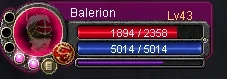
The color of the bar indicates your current fatigue level:
- Blue: Full charge / no fatigue penalty.
- Purple: 50% EXP penalty is active.
- Gray: 0% EXP status is active.
- Green: On some servers, the fatigue bar may appear green for players with Silver VIP or higher.
 How to Monitor and Refresh Your Fatigue
Even if you have Silver VIP or a higher VIP level, you should still monitor your Fatigue status.
If the fatigue timer is allowed to expire without refreshing your session, the EXP penalties described above may become active.
On servers using this configuration, the commonly used refresh method is:
- Monitor your fatigue timer while playing.
- Approximately once every 3 hours, teleport your character back to town.
- Log out of the game.
- Log back into your account.
- Check the Fatigue bar to confirm that the session status has refreshed correctly.
Important: Whether this refresh method works depends entirely on the configuration of the server you are playing on. Some servers may use different Fatigue System rules.
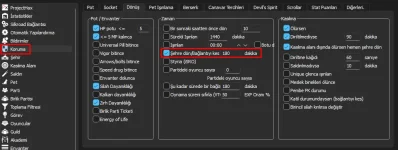
 phBot Fatigue Settings
If you are using phBot, there is a built-in option that can help manage this process automatically.
Important Notes
- The exact Fatigue System configuration can vary from one Silkroad Online server to another.
- EXP limits, disconnect behavior, reset times, and VIP privileges may be modified by the server administrator.
- Fatigue is usually tracked at the account level rather than separately for each character.
- Always check the rules and system information provided by the server you are currently playing on.
