






SROWAY — one-click fixer for Silkroad p-server clients that won't launch
Does this sound like you?
All of it comes down to a handful of Windows settings. SROWAY finds which one is broken and fixes it.
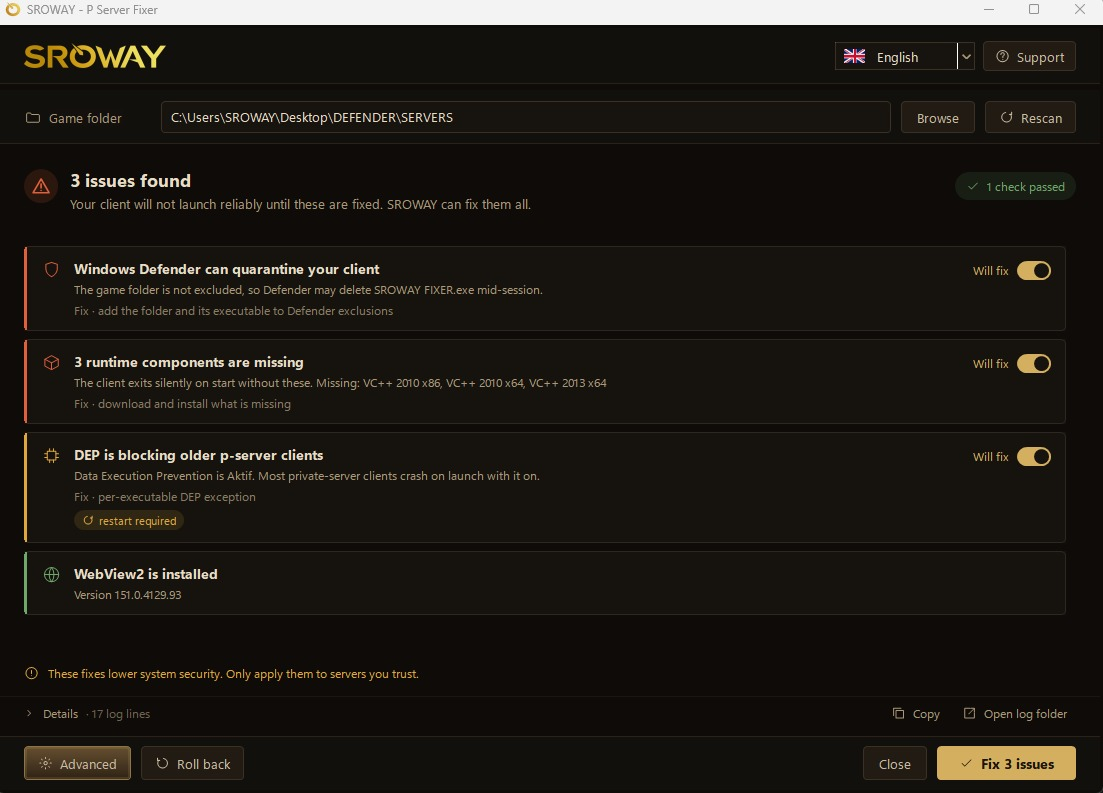
What it checks — and fixes
Scan runs automatically when you open it. Every issue has its own on/off switch, so you can skip anything you don't want. Then one button.
How to use it
Reboot only if it disabled DEP system-wide — it will ask.
Important notes
What it actually changes on your PC
Fair warning: this tool asks for admin, adds Defender exclusions and disables DEP — the exact behaviour of malware. Being suspicious is correct. So, specifically:
VirusTotal: scan results
Verify you got the same file — the SHA-256 below must match the one in that report:
Check it yourself: certutil -hashfile "SroWay Fixer.exe" SHA256
Advanced — every fix, one at a time
Plus six extra tools:
Download
Something went wrong?
Advanced → Tools → Create Support Bundle → a ZIP appears on your desktop → post it here.
It has the log, your system info and every status check. Far more useful than a screenshot — I don't have to guess. Contents are always in English, whatever language you use the app in.
Languages
English · Türkçe · العربية (with proper right-to-left layout). Starts in English; switch from the flag menu, top right. Your choice is remembered.
Changelog — v1.0.0
Questions, bugs, suggestions — post below.
READ FIRST
Only use this tool if you already trust the sro pvp server whose client you downloaded.
This tool tells Windows Defender to stop scanning your client folder. If that folder
contains something malicious, Defender will no longer catch it. The tool cannot tell a
safe client from an infected one — that judgement is yours.
Unknown server? Random Discord link? Scan the client on virustotal.com first, then come back.
Only use this tool if you already trust the sro pvp server whose client you downloaded.
This tool tells Windows Defender to stop scanning your client folder. If that folder
contains something malicious, Defender will no longer catch it. The tool cannot tell a
safe client from an infected one — that judgement is yours.
Unknown server? Random Discord link? Scan the client on virustotal.com first, then come back.
Does this sound like you?
- Client closes on startup, no error message
- sro_client.exe disappears mid-session — Defender ate it
- "Data Execution Prevention" error
- Launcher opens, but the window inside it is blank
- Works for your friend, not for you
All of it comes down to a handful of Windows settings. SROWAY finds which one is broken and fixes it.
What it checks — and fixes
- Defender exclusion — stops Defender deleting your client files
- DEP — the #1 cause of "crashes instantly on launch" on older clients
- Visual C++ 2010 / 2013 / 2015-2022 (x86 + x64) — missing runtime = silent exit, no error
- DirectX 9 — same silent-exit family
- WebView2 — the blank launcher window
Scan runs automatically when you open it. Every issue has its own on/off switch, so you can skip anything you don't want. Then one button.
How to use it
- Run SroWay Fixer.exe as administrator
- Pick your client folder (the one with sro_client.exe in it)
- Rescan → read what it found
- Fix issues
Reboot only if it disabled DEP system-wide — it will ask.
Important notes
- Using a third-party antivirus? Kaspersky, ESET, Avast, AVG, Bitdefender, Norton, Malwarebytes — SROWAY cannot add exclusions to those. It only handles Windows Defender. Add your client folder to your own AV's exclusion list manually, or it will keep deleting the files.
- Everything is reversible. The Roll back button removes every change: Defender exclusions, DEP settings, firewall rules, admin flags.
- Don't run this on a work or shared PC. It changes machine-wide security settings.
- Nothing is silent. Every action is logged on screen and to %TEMP%\SROWAY_*.log
- SmartScreen will warn you. The build isn't code-signed yet → "More info" → "Run anyway". If you're not comfortable with that, don't run it. That's a fair call.
What it actually changes on your PC
Fair warning: this tool asks for admin, adds Defender exclusions and disables DEP — the exact behaviour of malware. Being suspicious is correct. So, specifically:
- Defender: excludes only the folder you picked. Real-time protection stays on. System-wide protection stays on.
- DEP: tries system-wide first; if Secure Boot blocks it, only your client's .exe files get an exception. Rest of the system stays protected.
- Runtimes: downloaded from Microsoft's own servers, nowhere else.
- Network: used for exactly two things — those Microsoft downloads, and the update check. Nothing else leaves your PC.
- Never touched: your game files, account details, saved passwords.
VirusTotal: scan results
Verify you got the same file — the SHA-256 below must match the one in that report:
Code:
bb1144843a7ef1f8fe4ca78376eb25778cf1b23c41540a9b1033e8805cf20766Advanced — every fix, one at a time
Plus six extra tools:
- Close conflicting apps — MSI Afterburner, RivaTuner, Sandboxie, VM tools, Cheat Engine, Wireshark, Process Hacker, OBS
- Network test — latency, jitter, packet loss, bandwidth
- Support bundle — one ZIP with everything I need to help you
- Run-as-admin patch — no more UAC prompt on every launch
- Firewall rules — inbound + outbound allow rules for your client
- Update check
Download
- Version: 1.0.0
- Size: 438 KB
- Windows 10 / 11 · .NET Framework 4.8 (already on Win10 1903+) · admin rights
Something went wrong?
Advanced → Tools → Create Support Bundle → a ZIP appears on your desktop → post it here.
It has the log, your system info and every status check. Far more useful than a screenshot — I don't have to guess. Contents are always in English, whatever language you use the app in.
Languages
English · Türkçe · العربية (with proper right-to-left layout). Starts in English; switch from the flag menu, top right. Your choice is remembered.
Changelog — v1.0.0
- Scans on launch; issues named by their consequence, not by the setting ("Defender can quarantine your client")
- One-button fix, every issue individually skippable
- Real step-by-step progress with Cancel — no more frozen window
- Resizable window, correct at 125% / 150% display scaling
- Roll back now also clears firewall rules and run-as-admin flags
- English / Turkish / Arabic
- One-ZIP support bundle
Questions, bugs, suggestions — post below.
Last edited: